/ use-cases / ssl-expiry-monitoring
How to catch SSL certificate expiry before it hurts
Renewal is automated and mostly works, which is exactly why nobody notices when it quietly stops. Here is what to monitor and how to get warned early.
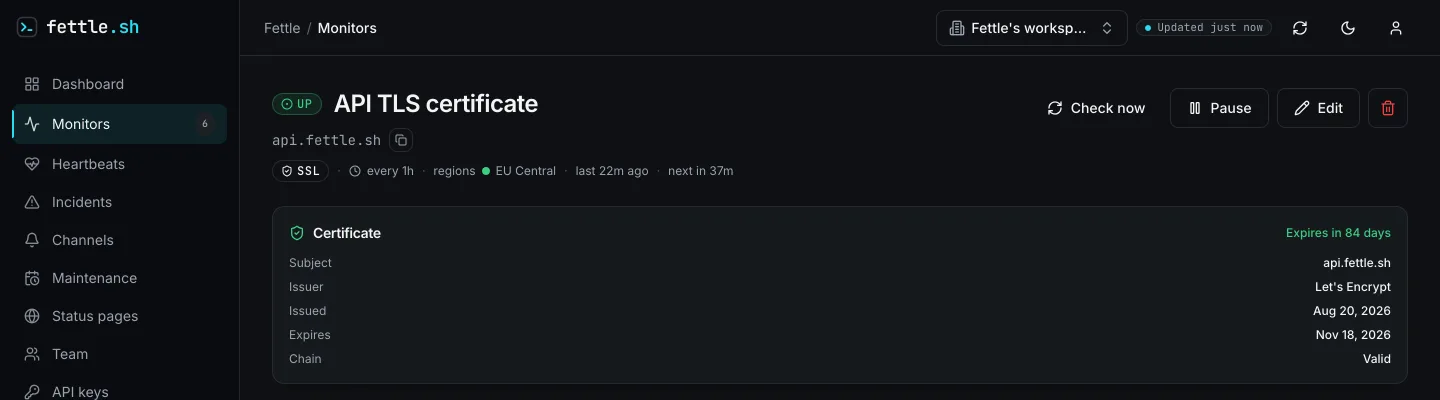
Why automated renewal still lets certificates expire
Manual certificate renewal is mostly a thing of the past. ACME clients like certbot, host-managed TLS on platforms like Vercel or Railway, and Kubernetes operators like cert-manager all renew certificates without a human clicking anything, and for most sites that works silently for years. The argument for monitoring expiry is not that automation is unreliable in principle — it fails in ways that produce no visible error, until the certificate is gone.
The concrete failure modes are worth naming, because "the renewal script broke" covers several
different things. A cron job or systemd timer running the renewal hook can stop firing — the
server gets rebuilt, the crontab does not come back with it, and nothing notices. An HTTP-01
challenge, which proves domain control by serving a token at a well-known path, breaks the
moment something intercepts that path first — a redirect rule to HTTPS before the challenge is
served, or a WAF rule blocking the /.well-known/acme-challenge/ path as suspicious. A DNS-01
challenge, which proves control by publishing a TXT record instead, breaks when the API token
the ACME client uses to update DNS rotates or expires and nobody updates the client's config.
And even a renewal that succeeds outright can fail the part that matters: the new certificate
lands on disk, but the server process is never told to reload it, so it keeps presenting the
old one until it restarts for an unrelated reason — or until it expires.
The stakes of getting caught by any of these have gone up, not down. Public certificate authorities used to issue certificates valid for a year or more; the CA/Browser Forum's ballot SC-081v3, approved by all major browser vendors in 2025, now caps new certificates at 200 days as of March 2026, dropping to 100 days in March 2027 and 47 days by March 2029. Let's Encrypt, the certificate authority behind most automated renewal in the first place, already issues 90-day certificates by default, with a 6-day option available and shorter defaults already scheduled — 64 days from February 2027, then 45 days from February 2028. Shorter lifetimes are good for security, but they also mean a renewal process that silently breaks now has a much smaller window before it becomes an outage — there is far less slack for "we'll notice eventually."
What is worth monitoring
An expiry date by itself is a narrow signal. What is worth watching on a certificate:
- The expiry date itself, checked independently of your renewal process — not "the cron job that renews certificates is still enabled," which tells you the automation exists, not that it is working.
- Chain validity, not just the leaf certificate — a server that forgot to serve an intermediate certificate will fail in some clients (which cache or fetch missing intermediates) and pass in others, which is exactly the kind of partial failure that goes unreported for a long time.
- Hostname match — a certificate that is valid, unexpired, and correctly chained but issued for the wrong name still fails every client that checks it, and expiry monitoring alone says nothing about it.
- Every node behind a load balancer, not just "the domain" as a single abstraction. If TLS is terminated per-node and one node is missing the latest certificate — a rollout that only partially completed — a check that happens to land on a healthy node will read as fine.
- Any secondary domain serving its own certificate — a
status.subdomain, an API host, a marketing site on a different platform than the app — since each one renews independently and a healthy main domain says nothing about the others.
It is worth being explicit about what expiry monitoring does not cover. It says nothing about revocation — a certificate can be pulled by its CA before its expiry date for reasons unrelated to age, and an expiry check alone will not catch that. It is a check on one specific failure mode of TLS, not a general TLS health check, even though it is often the highest-value one to automate because it carries a countdown clock.
How to set it up in Fettle
- Create an API key with write scope from Settings → API Keys.
- Add an SSL monitor pointed at the host and port that terminates TLS for the domain — the bare hostname, not a full URL. Fettle's worker opens a real TLS handshake against it on the schedule you set, verifies the chain and hostname, and records the certificate's expiry date on the monitor.
- Set the warning window with
warn_before_daysin the monitor'sconfig— the number of days before expiry that Fettle should treat the certificate as needing attention. It defaults to 14 and accepts anywhere from 1 to 365 days, so a certificate on a 200-day public-CA lifetime and one on a 90-day Let's Encrypt lifetime can each get a window sized to how much runway their renewal process actually needs. - The request looks like this:
curl -s -X POST https://api.fettle.sh/v1/monitors \
  -H "Authorization: Bearer fettle_your_key_here" \
  -H "Content-Type: application/json" \
  -d '{
        "name": "example.com certificate",
        "type": "SSL",
        "target": "example.com",
        "interval_seconds": 3600,
        "timeout_seconds": 10,
        "regions": ["eu-central", "us-east"],
        "config": {
          "warn_before_days": 21,
          "port": 443
        }
      }'
An hourly interval is plenty for a certificate check — nothing about TLS expiry needs a 30-second poll, so this is a good place to spend the monitor budget elsewhere. Repeat the monitor for each domain and each load-balanced node worth checking independently, and use the SSL checker tool to see a certificate's issuer, validity window and full chain before deciding what to point a monitor at. The full walkthrough for generating a key and reading monitor state back through the API is in the quickstart guide.
Prefer an MCP-aware client to raw curl? Point it at the same account with this one-liner:
{
  "mcpServers": {
    "fettle": {
      "url": "https://api.fettle.sh/mcp",
      "headers": { "Authorization": "Bearer fettle_your_key_here" }
    }
  }
}
Which alerts to wire
A certificate expiring is one of the few failures with a genuine deadline attached, which makes
the alert channel matter less than the lead time. Fettle sends alerts by email, Slack, Telegram
or a generic webhook — the warning fires once the certificate enters the warn_before_days
window, independent of the monitor's regular TLS check status.
Set warn_before_days with the actual renewal process in mind, not a round number. A domain on
automated 90-day Let's Encrypt renewal that already retries for weeks before expiry needs a
shorter window than a certificate issued manually or through a process nobody has audited
recently — give the slower process enough days for a human to intervene before the countdown
reaches zero, not just enough to be told on the day. Wire the alert to whichever channel
someone will actually act on quickly, since the whole value here is the runway between the
warning and the outage — a warning nobody reads until the certificate has already expired is no
better than no warning at all. How many monitors and alert channels each plan includes is on
the pricing page.
Questions
- Doesn't certbot or my host renew certificates automatically?
- Usually, yes — and that is the problem. Automated renewal fails quietly: a hook that stops running, a broken ACME challenge, or a cert renewed on disk but never reloaded by the running server all produce the same silent outcome as no automation at all.
- If the certificate is not expired, is the site definitely fine?
- No. A hostname mismatch, a missing intermediate certificate, a revoked cert, or one node behind a load balancer serving the wrong certificate all break clients while the expiry date is still comfortably in the future.
- What does Fettle's SSL monitor actually check?
- It opens a TLS connection to your host and port on a schedule, verifies the certificate chain and hostname, and tracks the expiry date — separately from the warning window you set for alerts.
Start monitoring in a minute
The free plan checks up to 20 monitors as often as every 2 minutes from 2 regions, and emails you when one breaks. See pricing for the paid intervals, or follow the quickstart to do it from the API.